Multiple Canva
This demo illustrates how to compose multiple synchronized canvae in one window. It creates three clock canvae for different time zones and updates each one continuously, demonstrating multi-panel layouts and independent item updates.
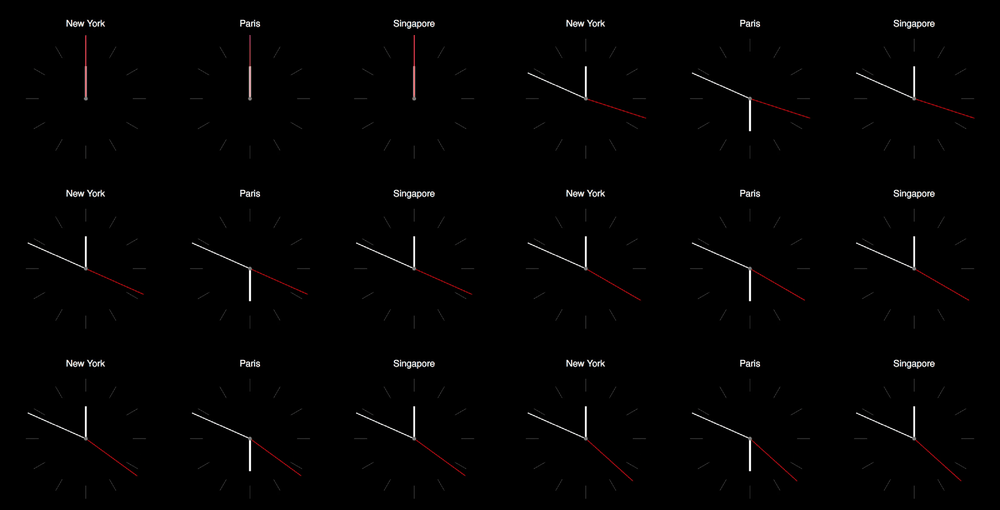
Full Code
Note
This demo requires the pytz package.
  1'''
  2Multiple canvas demo
  3
  4NB: This demo requires to install pytz
  5pip install pytz
  6'''
  7
  8import os
  9import types
 10import datetime
 11import pytz
 12import numpy as np
 13import anim
 14
 15# ═══ 2D Animation ═════════════════════════════════════════════════════════
 16
 17class clock(anim.plane.canva):
 18
 19  # ────────────────────────────────────────────────────────────────────────
 20  def __init__(self, window, city):
 21
 22    # Parent constructor
 23    super().__init__(window,
 24                     boundaries=[[-1,1], [-1,1.5]],
 25                     display_boundaries = False)
 26
 27    # Timezone
 28    self.timezone = pytz.timezone(city)
 29
 30    # Fetch time
 31    D = self.data()
 32
 33    # ─── Hours
 34
 35    self.item.hours = anim.plane.line(
 36        position = [0,0],
 37        dimension = [0,0.5],
 38        thickness = 0.03,
 39        color = 'white'
 40      )
 41
 42    # ─── Minutes
 43
 44    self.item.minutes = anim.plane.line(
 45        position = [0,0],
 46        dimension = [0, 1],
 47        thickness = 0.015,
 48        color = 'white'
 49      )
 50
 51    # ─── Seconds
 52
 53    self.item.seconds = anim.plane.line(
 54        position = [0,0],
 55        dimension = [0,1],
 56        thickness = 0.01,
 57        color = 'red'
 58      )
 59
 60    # ─── City name
 61
 62    self.item.city = anim.plane.text(
 63      position = [0,1.2],
 64      string = os.path.basename(city).replace('_', ' '),
 65      fontsize = 0.2,
 66      color = 'white'
 67    )
 68
 69    # ─── Decorations
 70
 71    self.item.center = anim.plane.circle(
 72      radius = 0.03
 73    )
 74
 75    r = 0.75
 76    for i in range(12):
 77     a = i*np.pi/6
 78     self.item[f'marker_{i}'] = anim.plane.line(
 79      position = [r*np.cos(a), r*np.sin(a)],
 80      dimension = [0.2, 0],
 81      orientation = a,
 82      zvalue = -1
 83    )
 84
 85
 86
 87  # ────────────────────────────────────────────────────────────────────────
 88  def data(self):
 89
 90    D = types.SimpleNamespace()
 91
 92    now = datetime.datetime.now(self.timezone)
 93    D.m = now.minute
 94    D.s = now.second
 95
 96    D.ha = -now.hour/6*np.pi
 97    D.ma = -now.minute/30*np.pi
 98    D.sa = -now.second/30*np.pi
 99
100    return D
101
102  # ────────────────────────────────────────────────────────────────────────
103  def update(self, t):
104
105    # Update timer display
106    super().update(t)
107
108    D = self.data()
109
110    self.item.hours.orientation = D.ha
111    self.item.minutes.orientation = D.ma
112    self.item.seconds.orientation = D.sa
113
114# ═══ Main ═════════════════════════════════════════════════════════════════
115
116W = anim.window('Multiple canvas',
117                height = 0.5,
118                aspect_ratio = 3)
119
120# Add animation
121W.add(clock, city='America/New_York')
122W.add(clock, city='Europe/Paris')
123W.add(clock, city='Asia/Singapore')
124
125W.show()